Getting Ready to Start Futures Trading
1-1What You Need to Trade Futures
① An Overseas Futures Exchange Account — Futures involve leverage, short-selling and derivatives, so you must trade on a reputable, well-regulated overseas futures exchange only.
② USDT / USDC (Stablecoins for Trading) — The base currency for futures is mostly USD stablecoins. Your margin, the basis for PnL, and the asset for liquidation decisions are all stablecoins.
- USDT — The oldest with the largest liquidity. Controversy over reserve transparency persists
- USDC — Highly trusted on a US-regulated basis, but liquidity is lower than USDT
- USDT if you prioritize fast trading and mobility; USDC if you prioritize regulation and stability
1-2Opening a Futures Account (Sign Up & KYC)
Below is an example based on Gate.io . Screens may differ by exchange.
▸ Sign Up
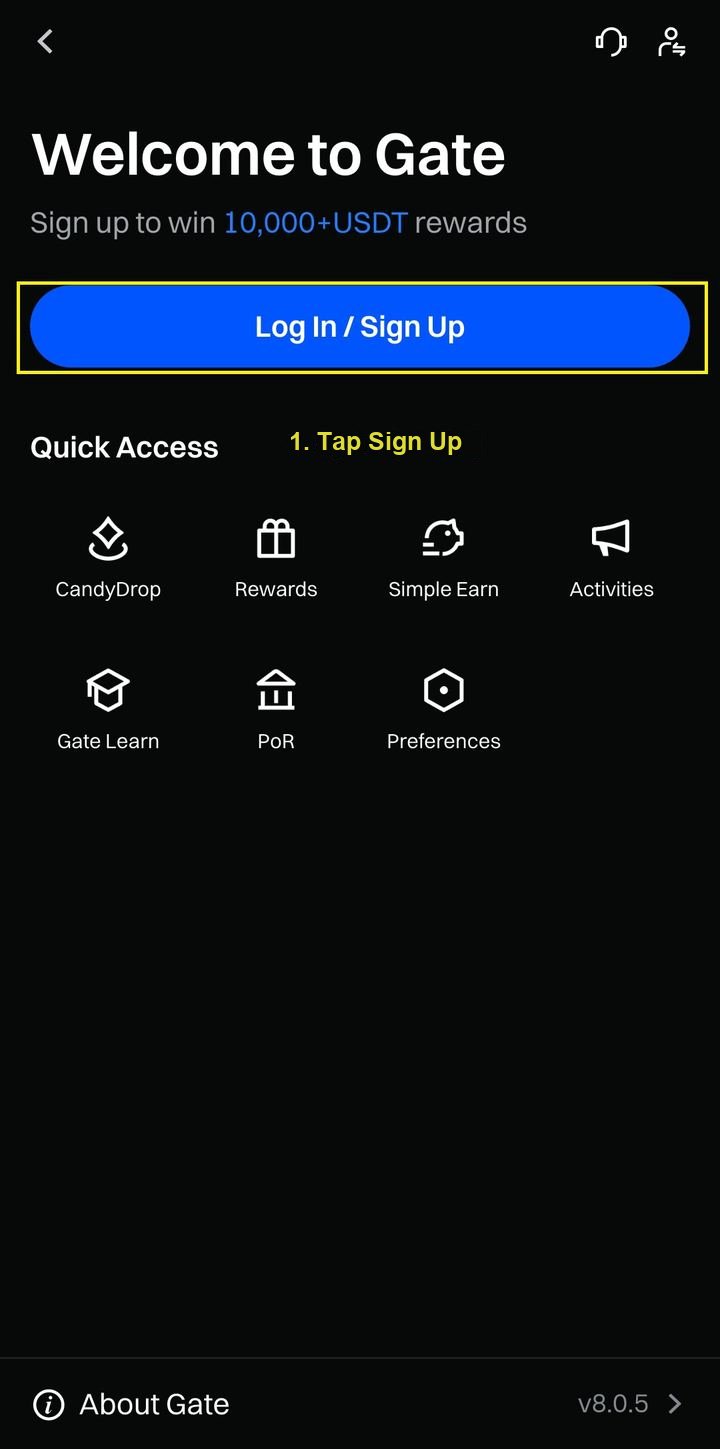
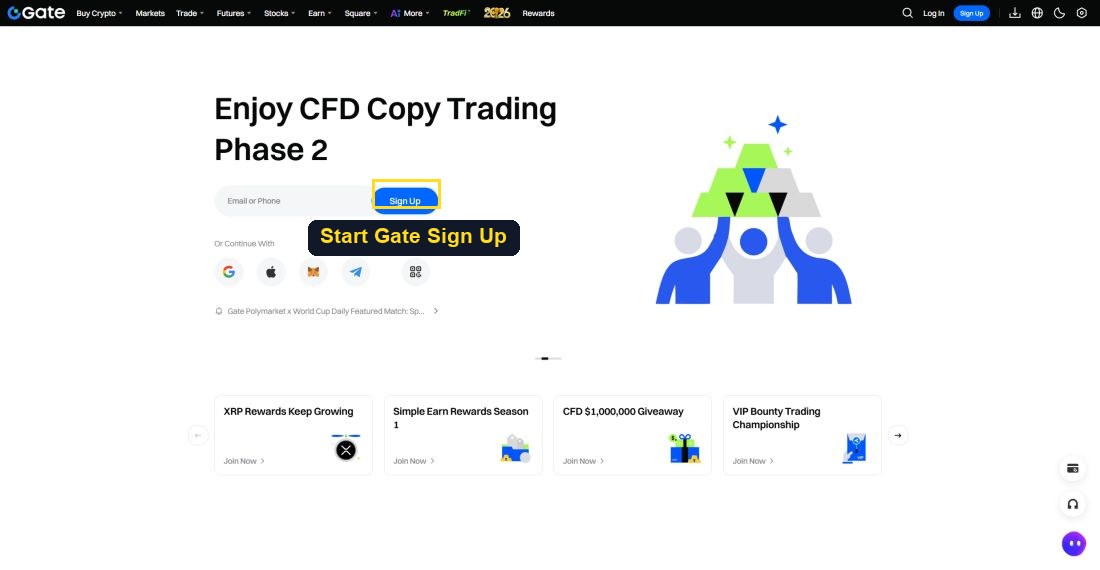
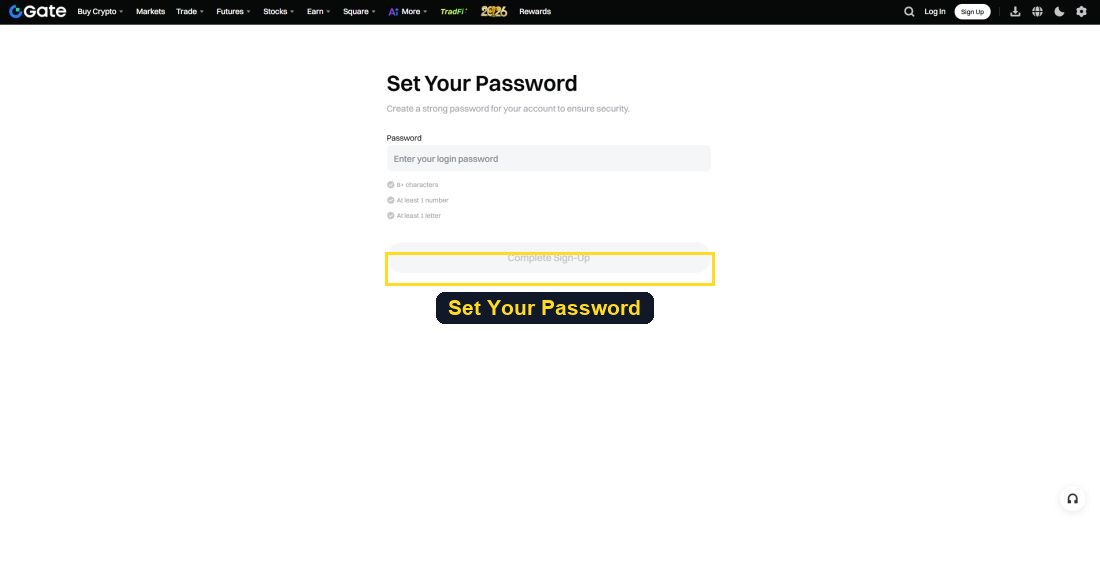
After installing the app or visiting the website, click the 'Log In / Sign Up' button.
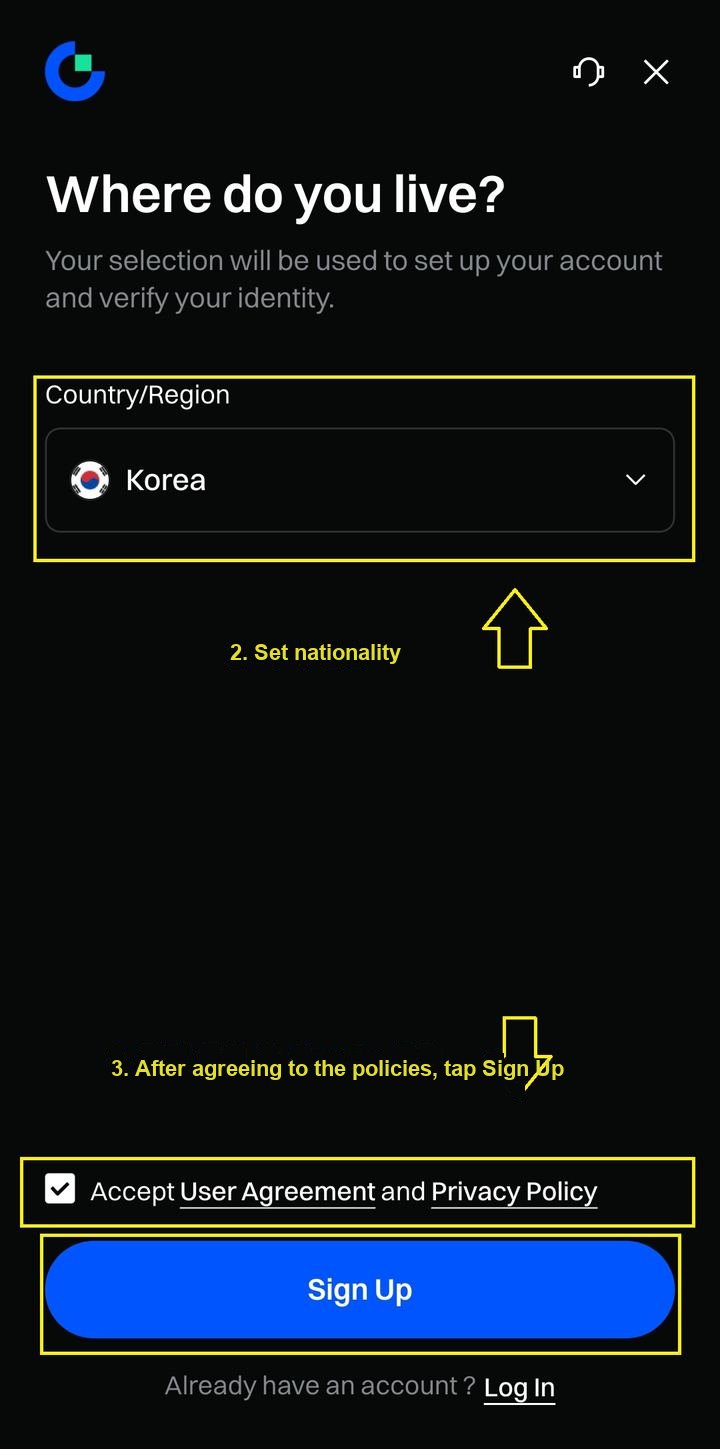
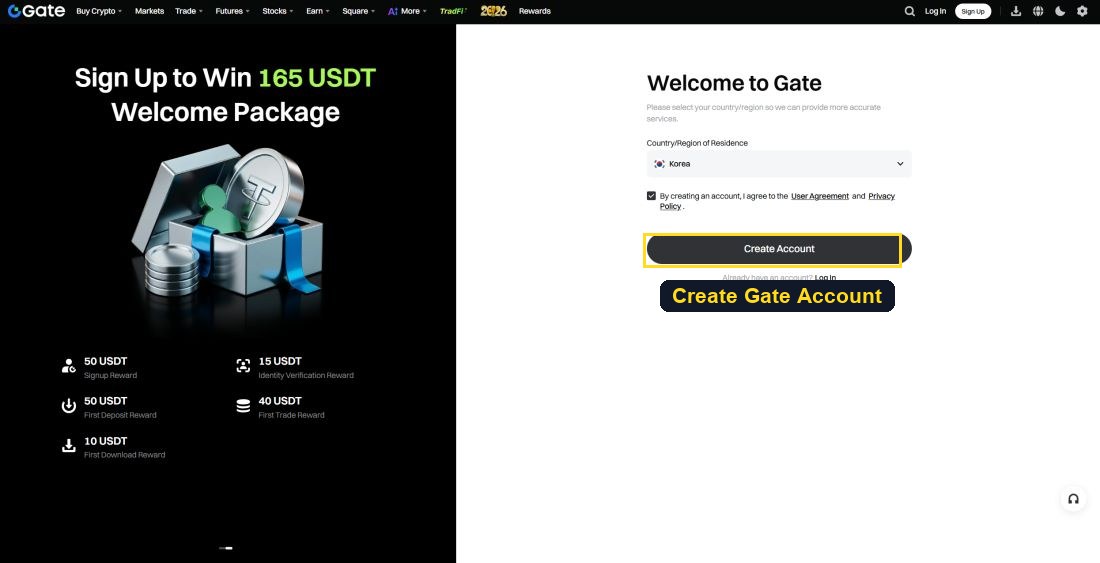
After agreeing to the Terms of Service and Privacy Policy, click 'Sign Up'.
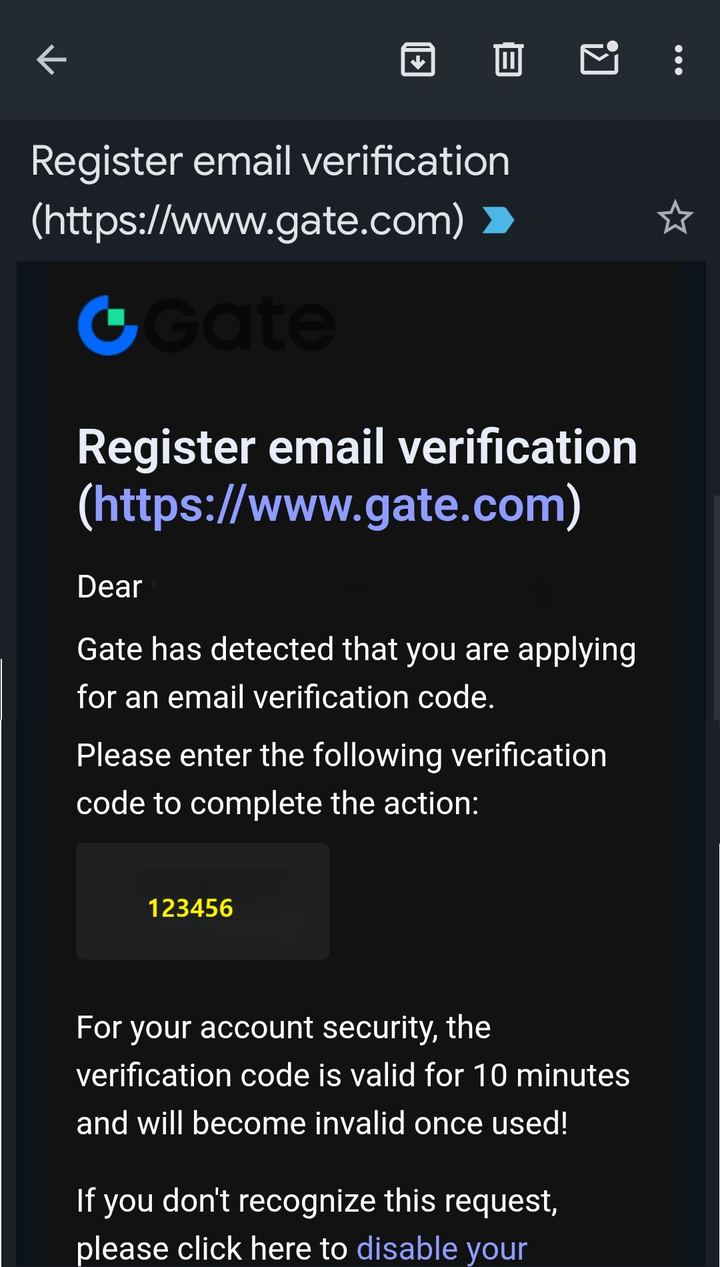
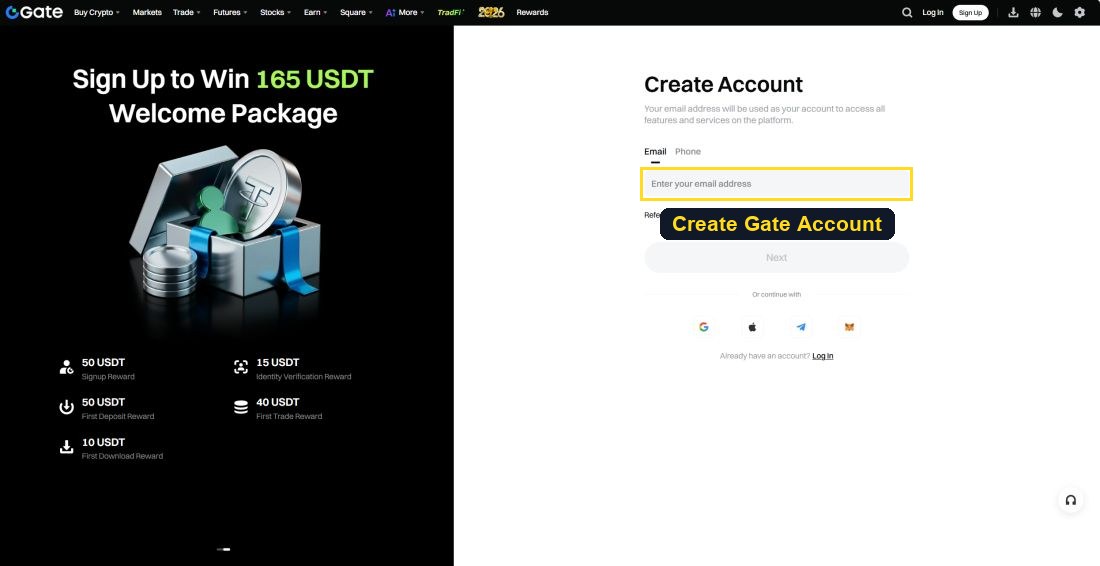
Choose Email or Phone as the sign-up method and enter the 6-digit verification code that was sent.
▸ KYC (Identity Verification)
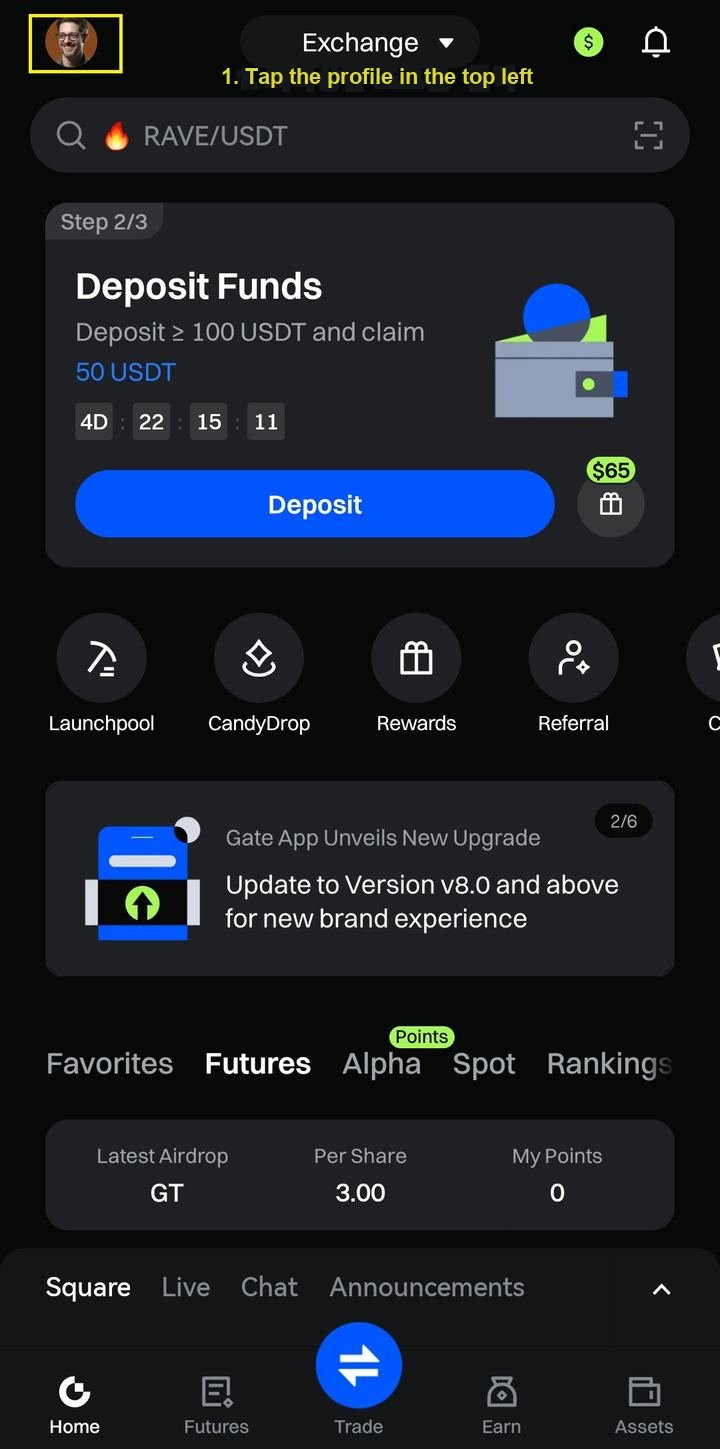
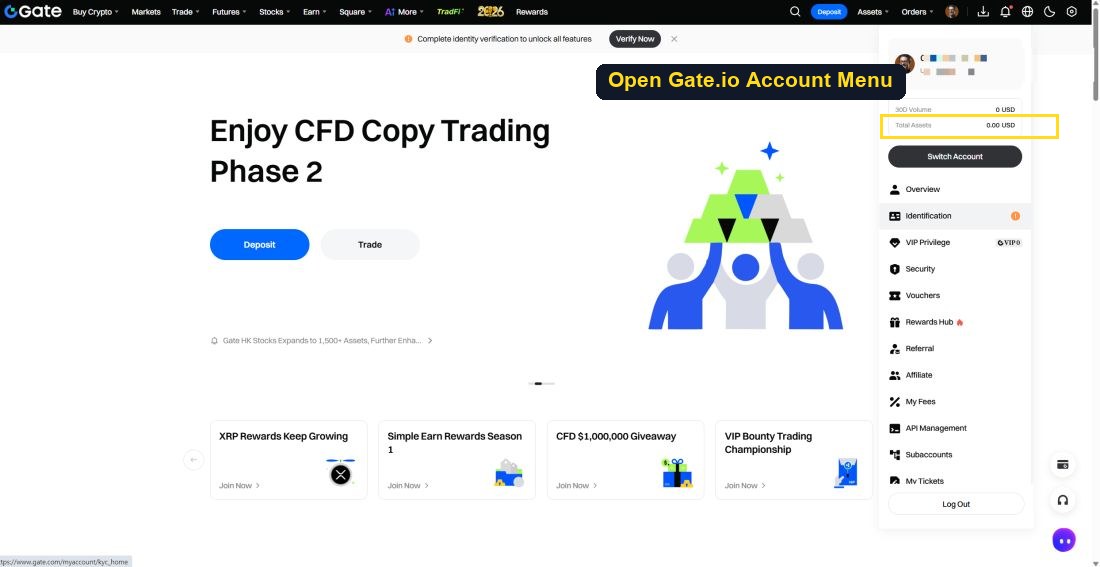
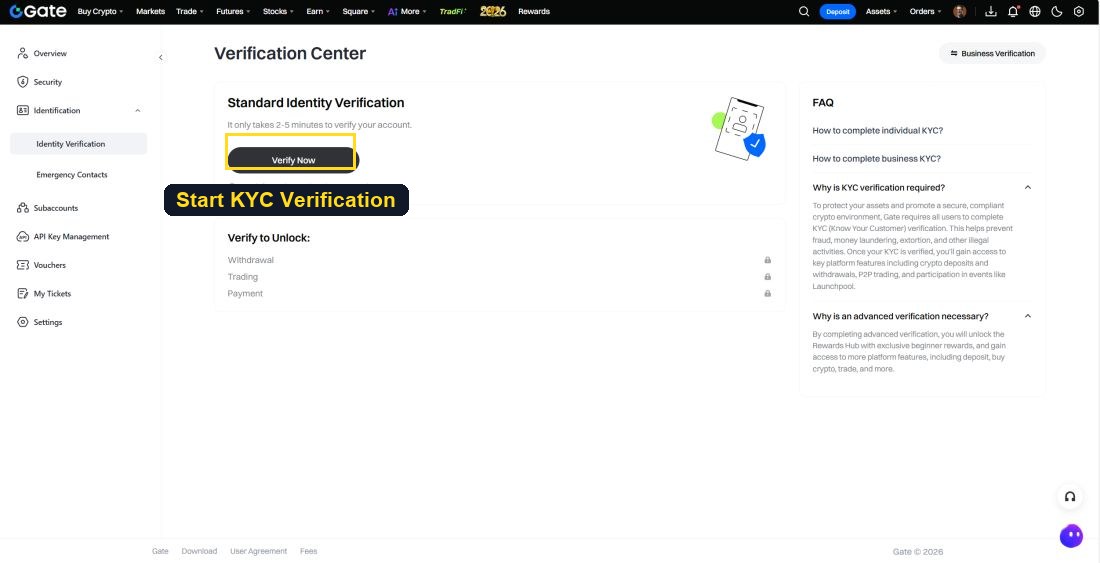
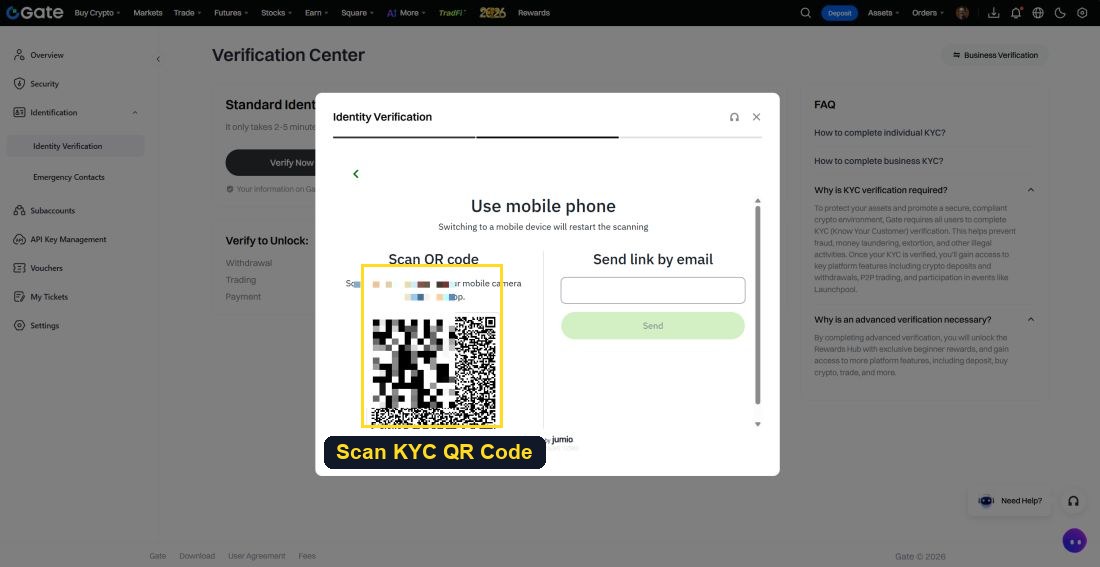
Click your profile at the top left, then click the KYC (Identity Verification) button.
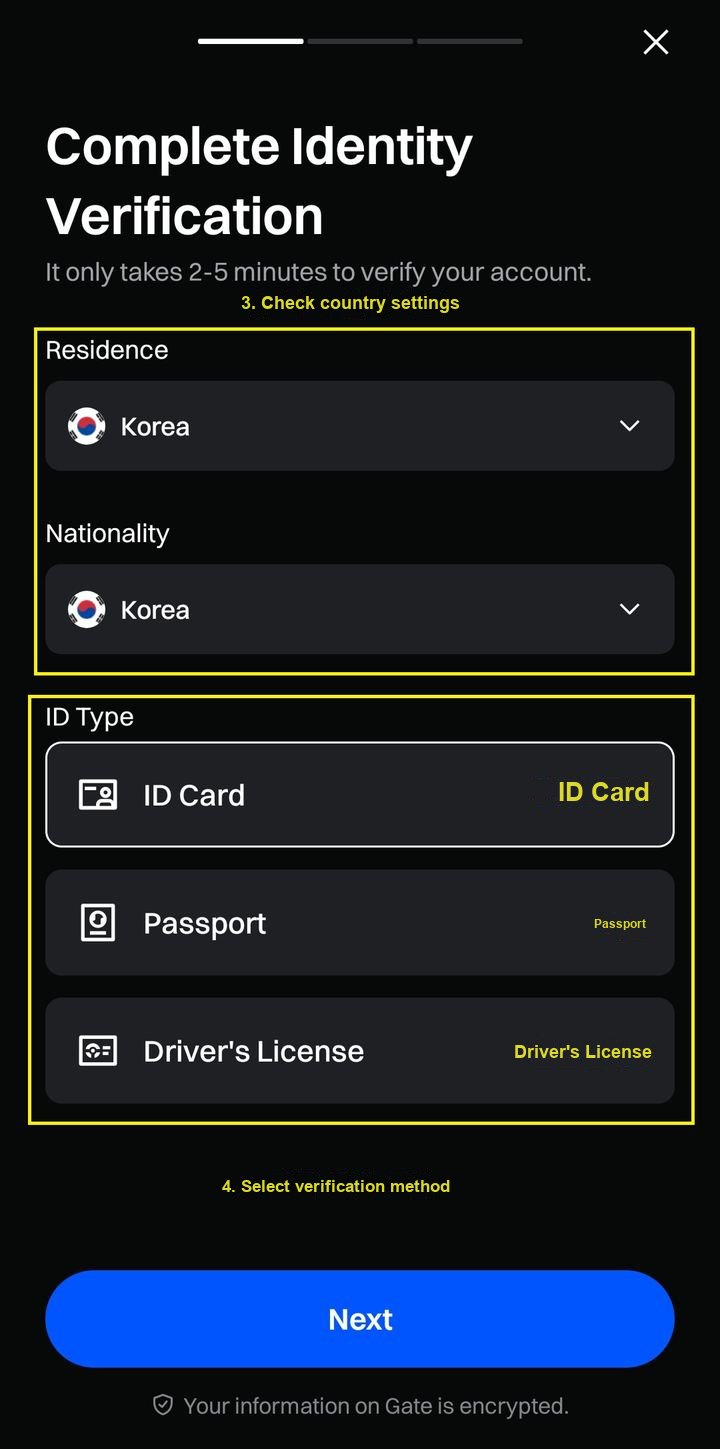
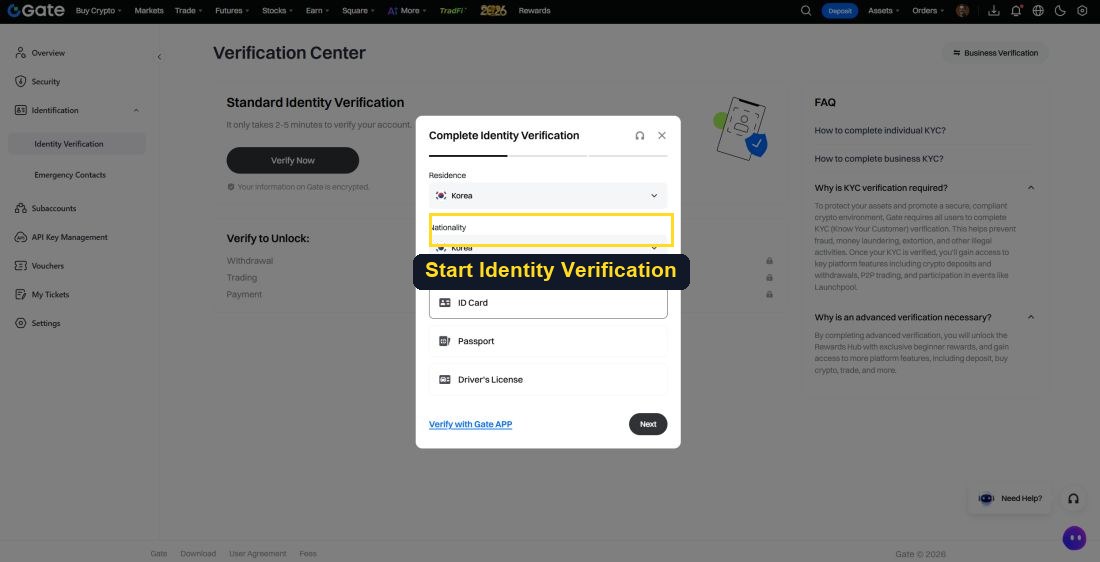
Select your Residence and Nationality, and the type of ID to verify (national ID card / passport / driver's license).
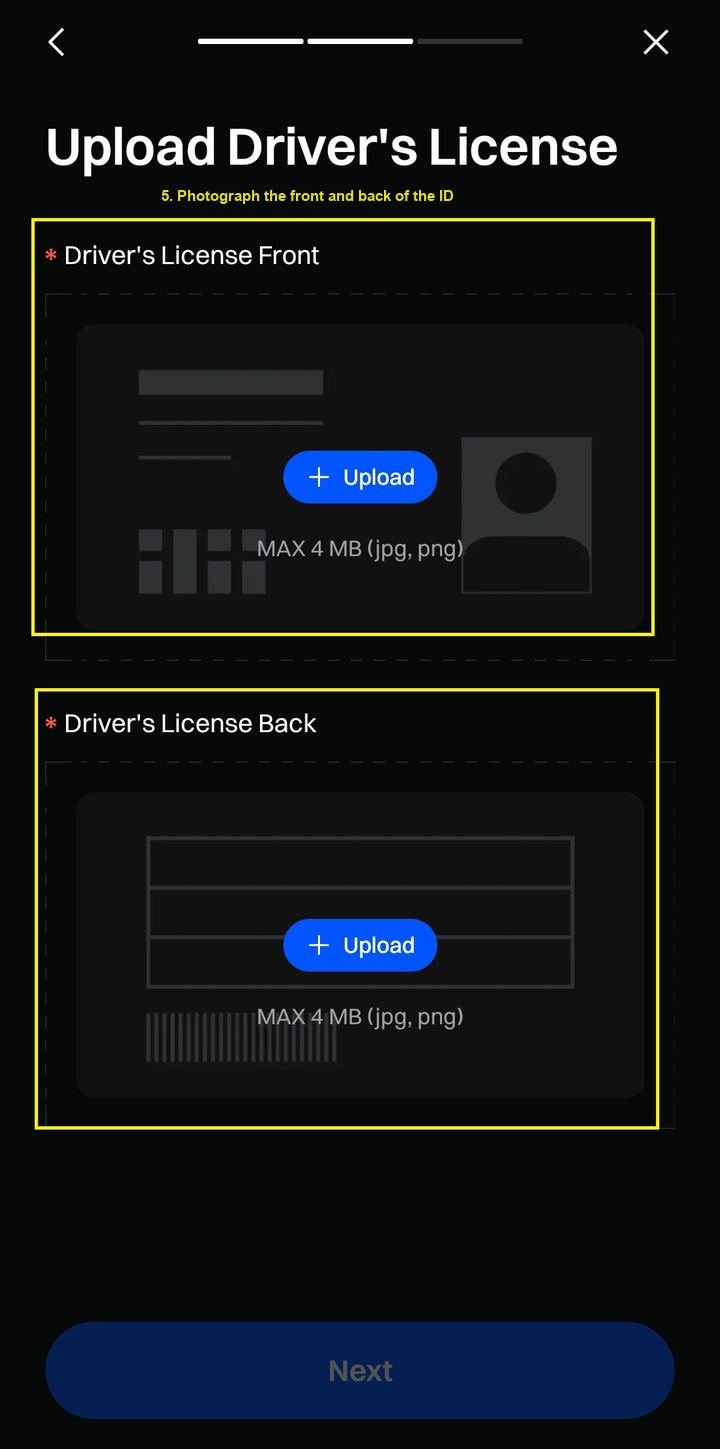
Upload the front/back of your ID remotely.

Following the guidance (remove masks, glasses, and any covering elements), complete selfie face verification.
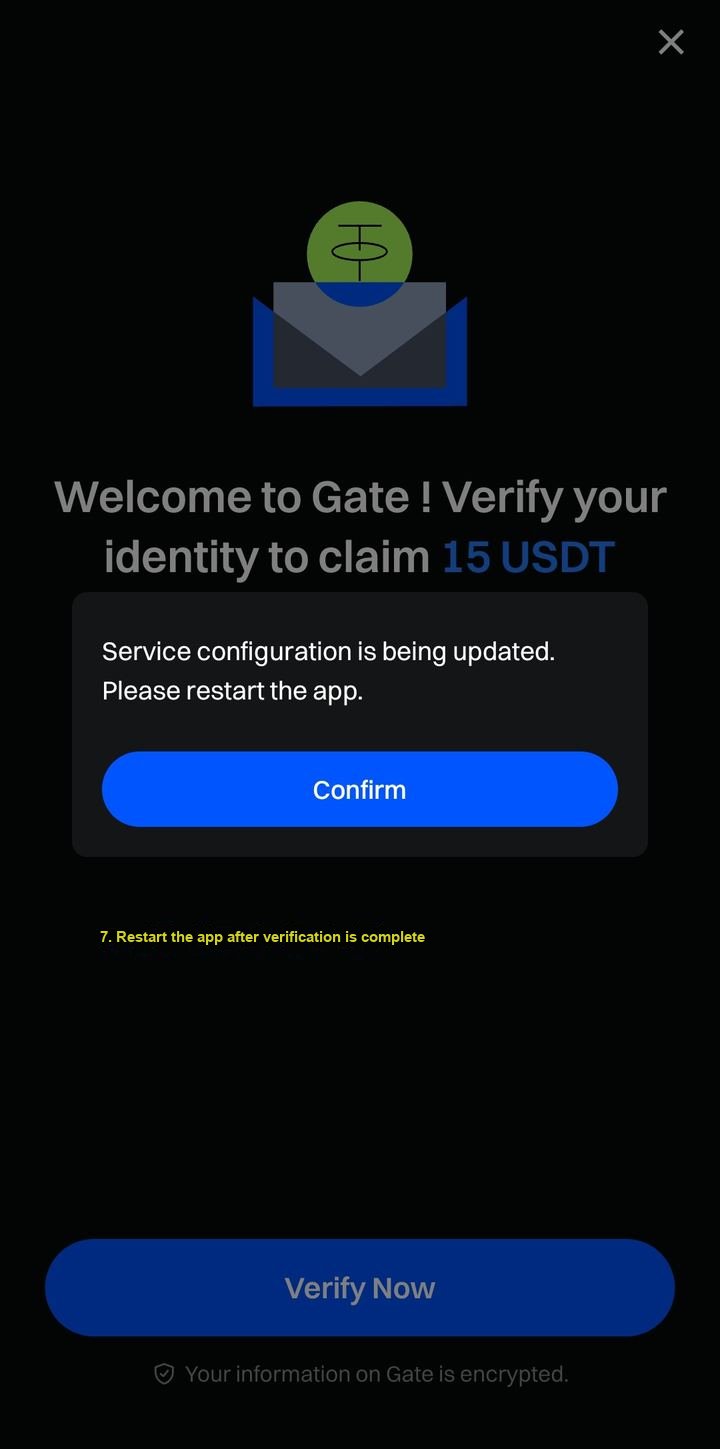
After waiting for verification, KYC is complete when the 'Verified' label appears.
1-3Depositing Tether to the Futures Exchange
- Network Selection — USDT exists on multiple networks (the most commonly used is TRC20/Tron). If the origin and destination networks differ, funds are permanently lost. Check the networks the receiving exchange supports first
- Minimum Transfer Amount — Each exchange sets a minimum deposit/withdrawal amount; sending less than the threshold will not be credited
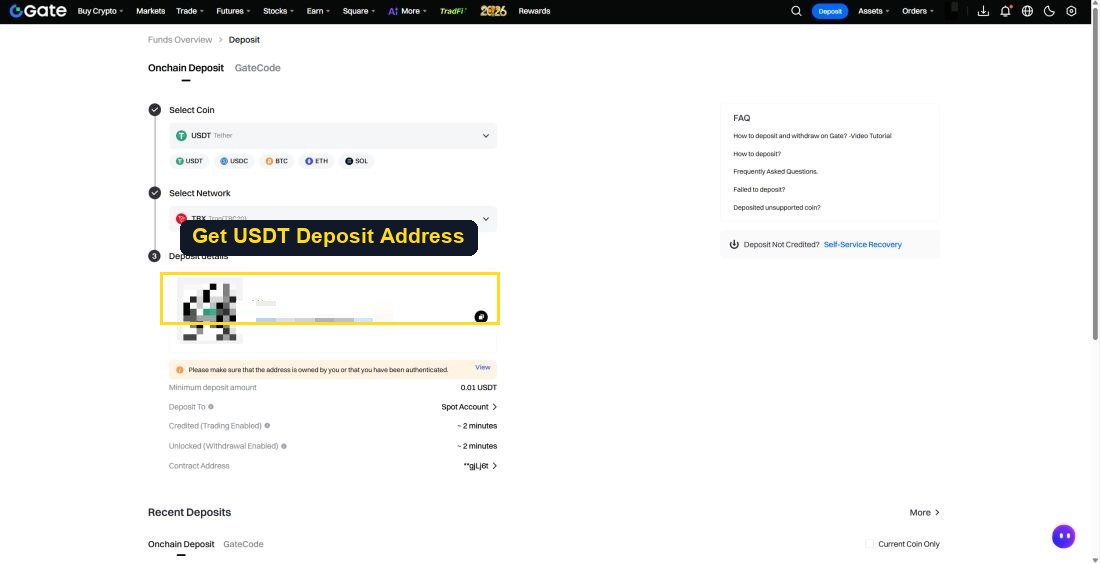
▸ Checking the Deposit Address (Gate.io Example)
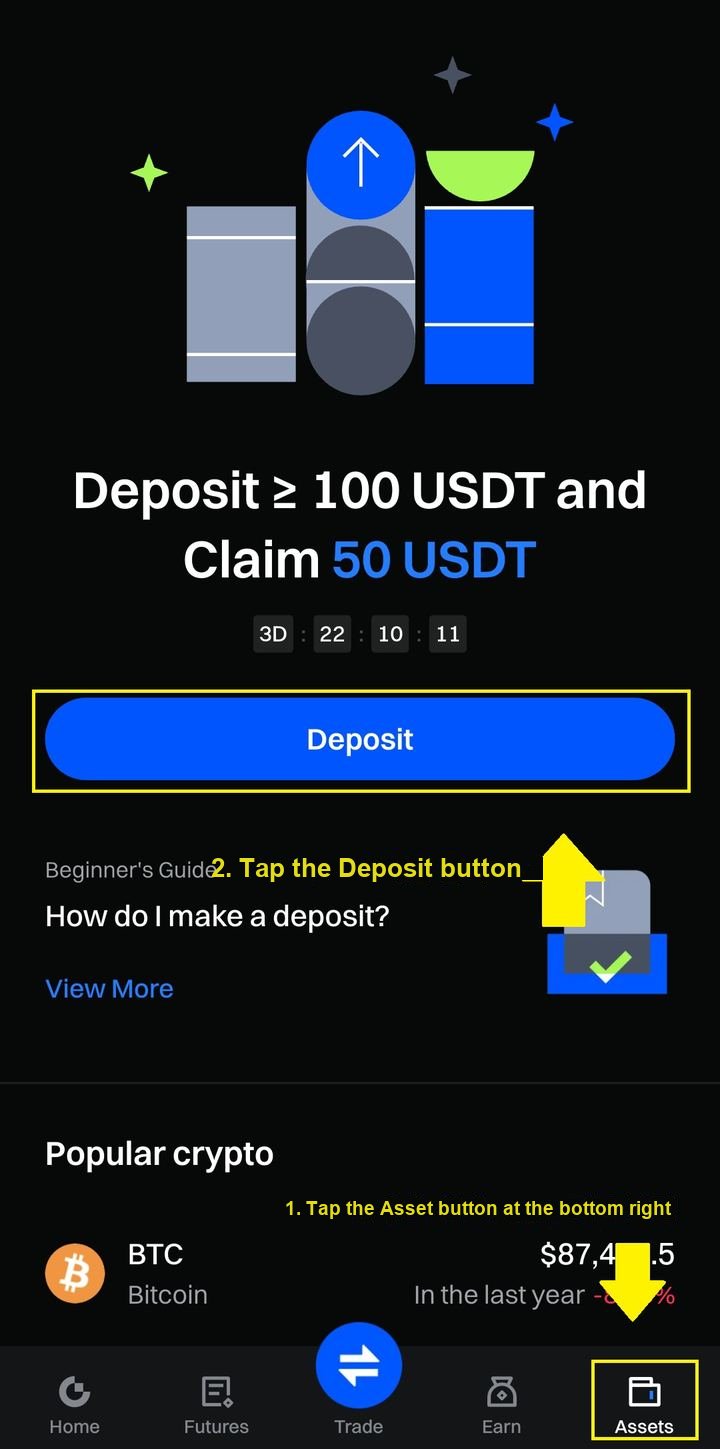
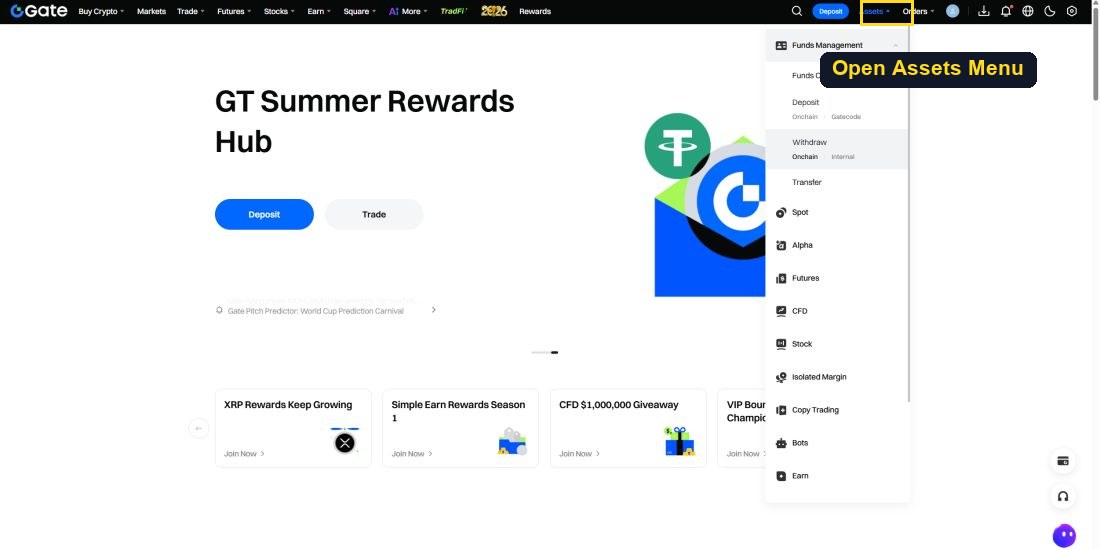
At the bottom right, click Asset → Deposit → Onchain Deposit.
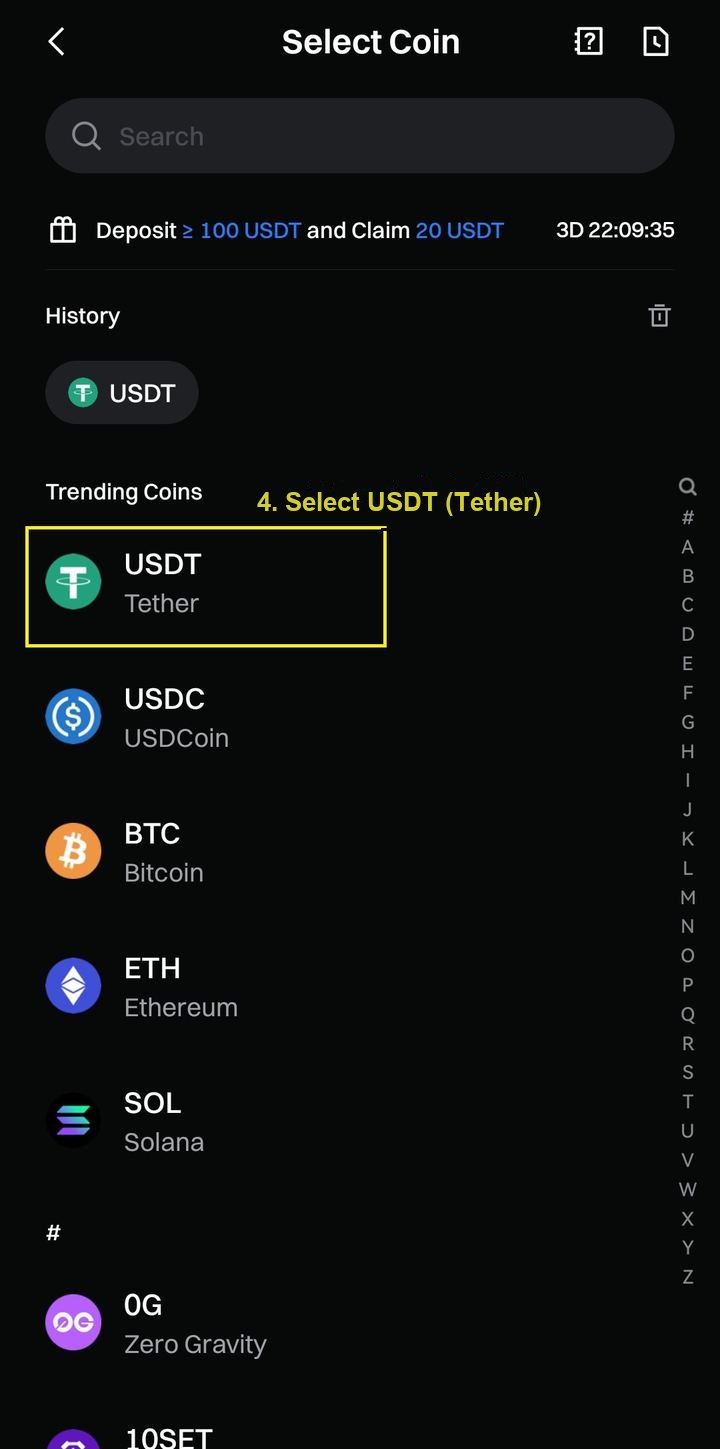
Select the coin to transfer (Tether), then select the network (Tron/TRC20).
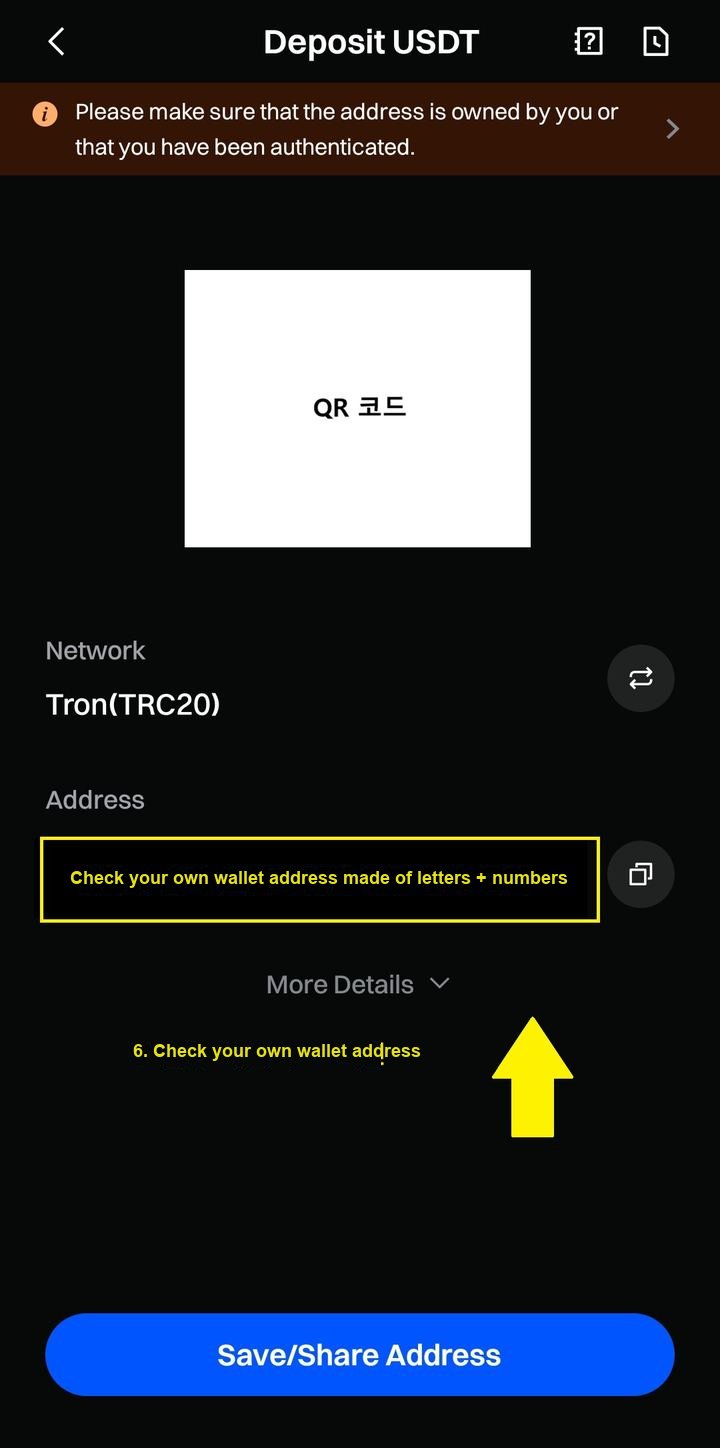
Confirm the generated deposit wallet address that belongs to you. (Send Tether to this address)
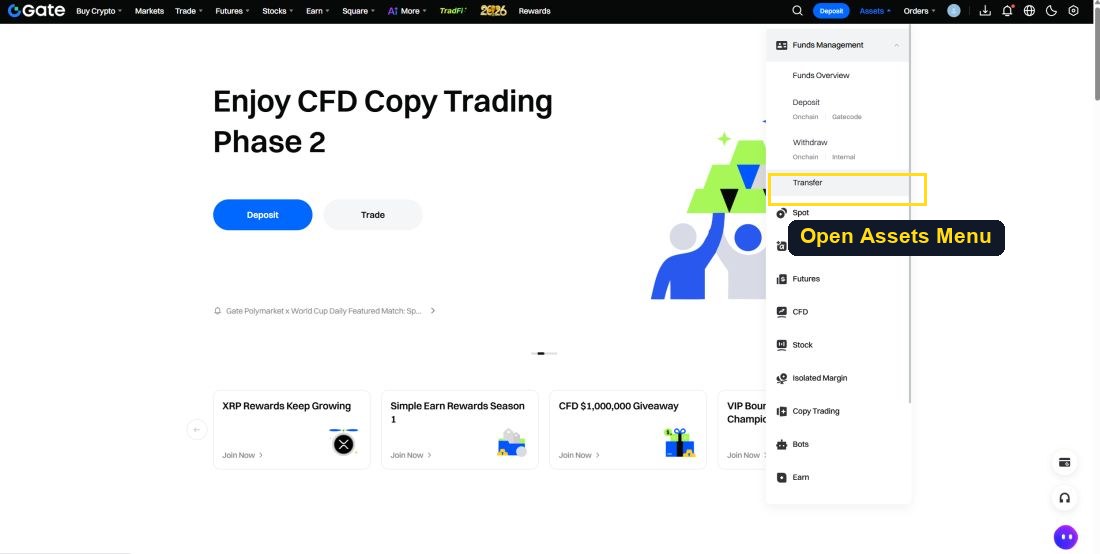
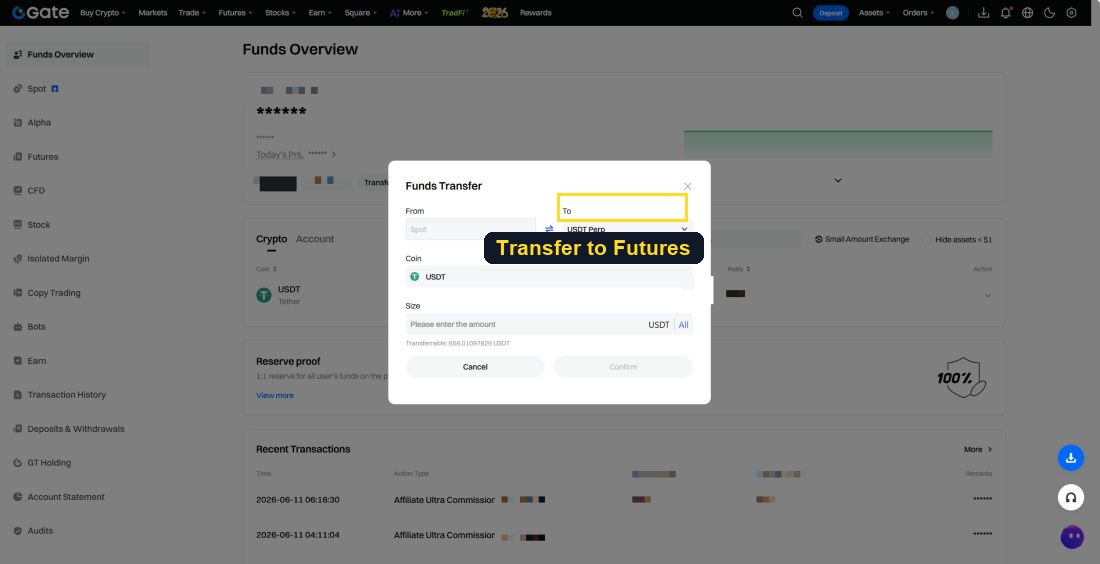
▸ Transferring Seed Funds to the Futures Account (Gate.io Example)
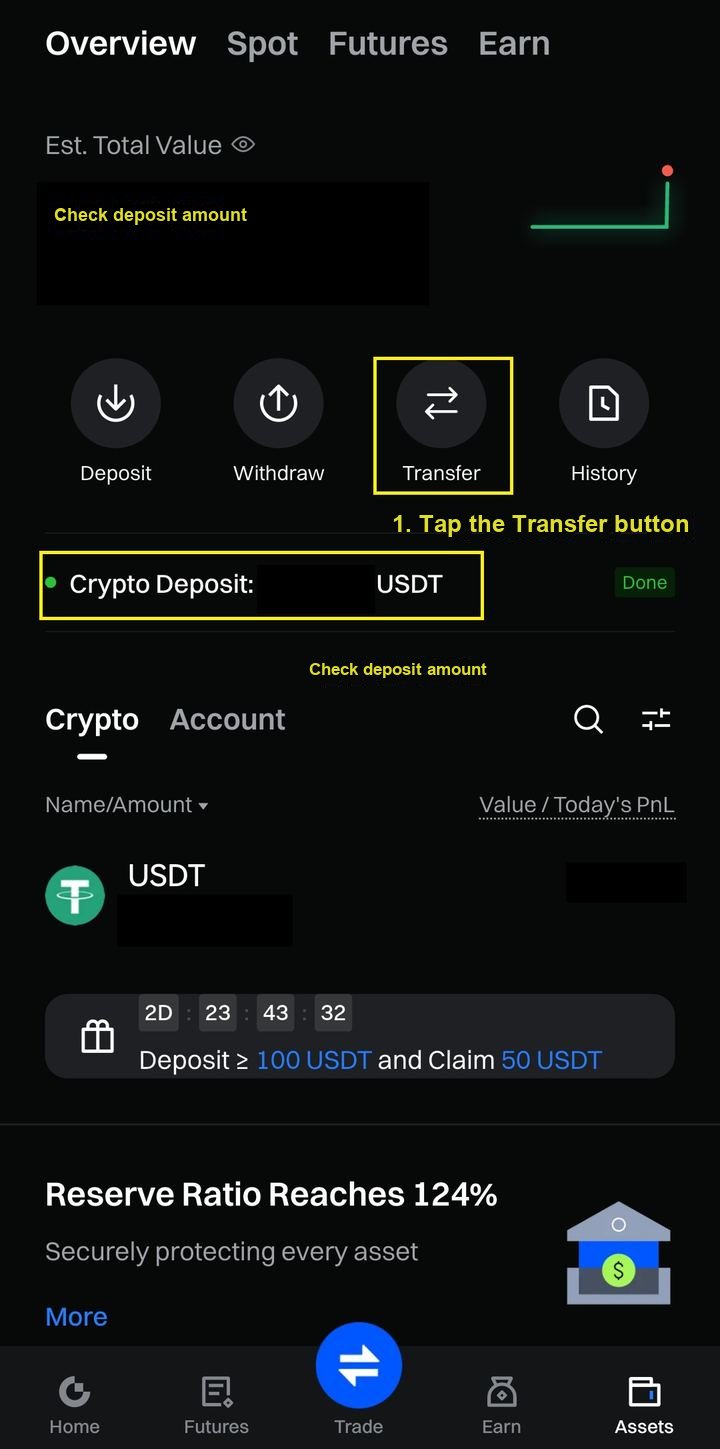
After confirming the deposited amount, click the Transfer (internal transfer) button.
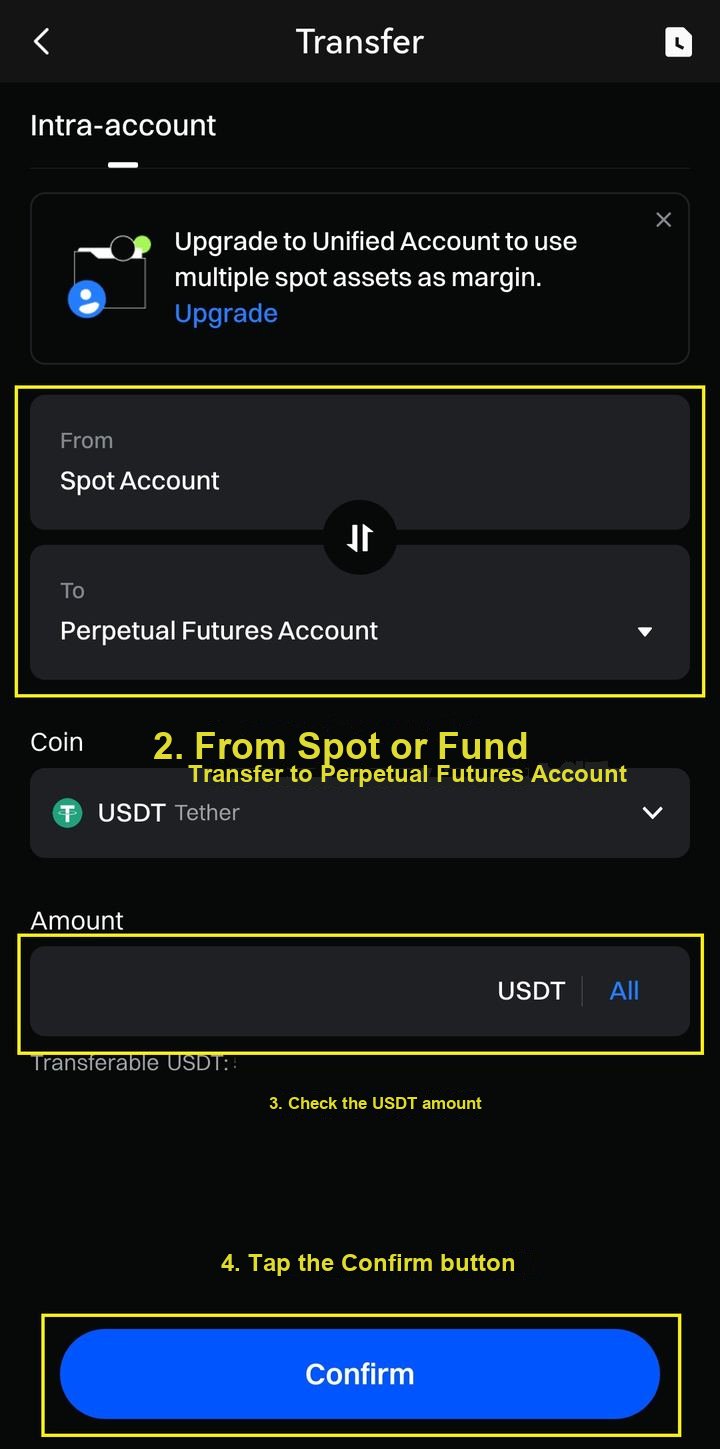
From 'Spot' or 'Fund', internally transfer to the Perpetual Futures Account.
1-4Withdrawing (Gate.io example)
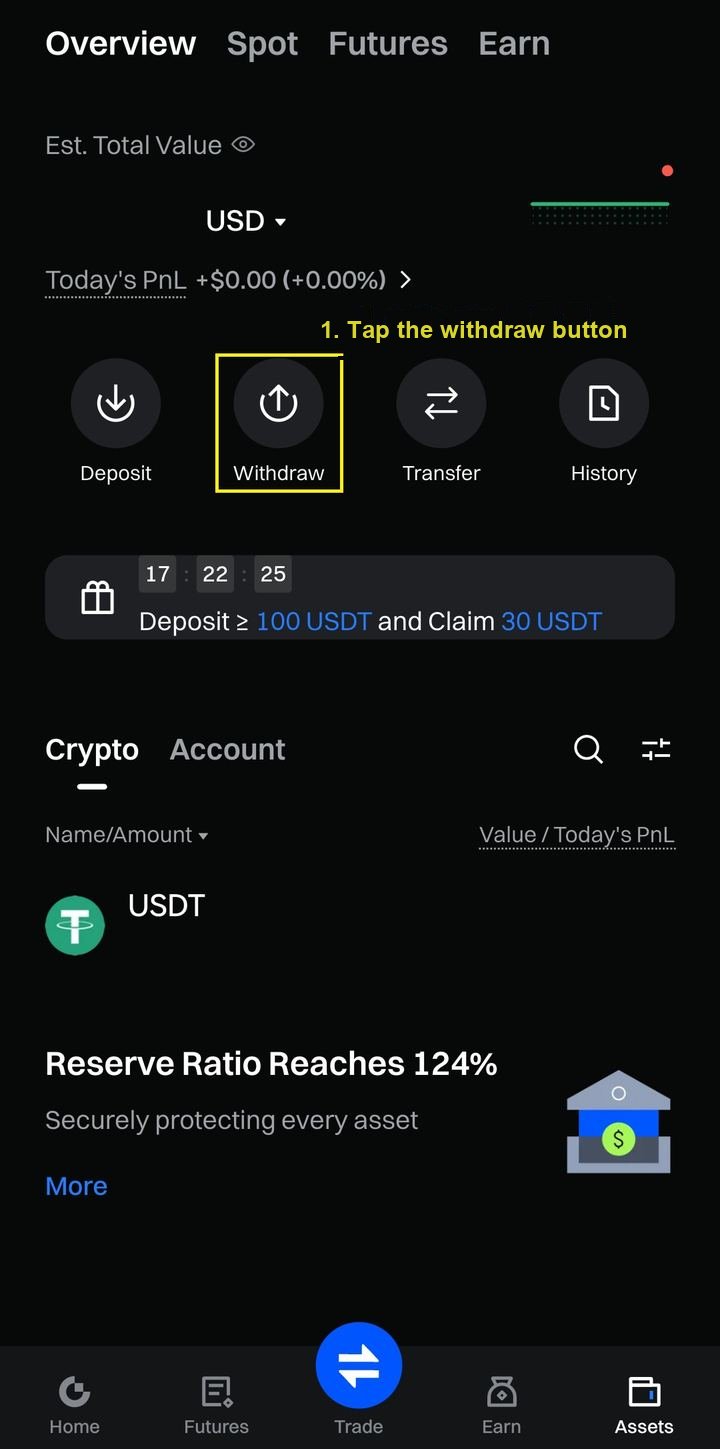
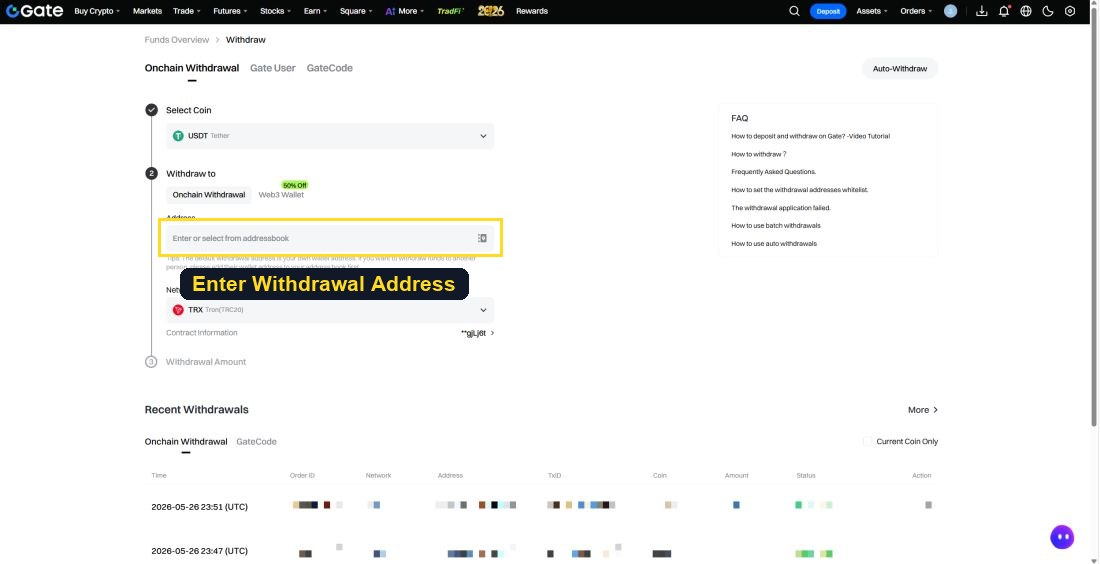
Click 'Withdraw' → 'Onchain Withdrawal'.
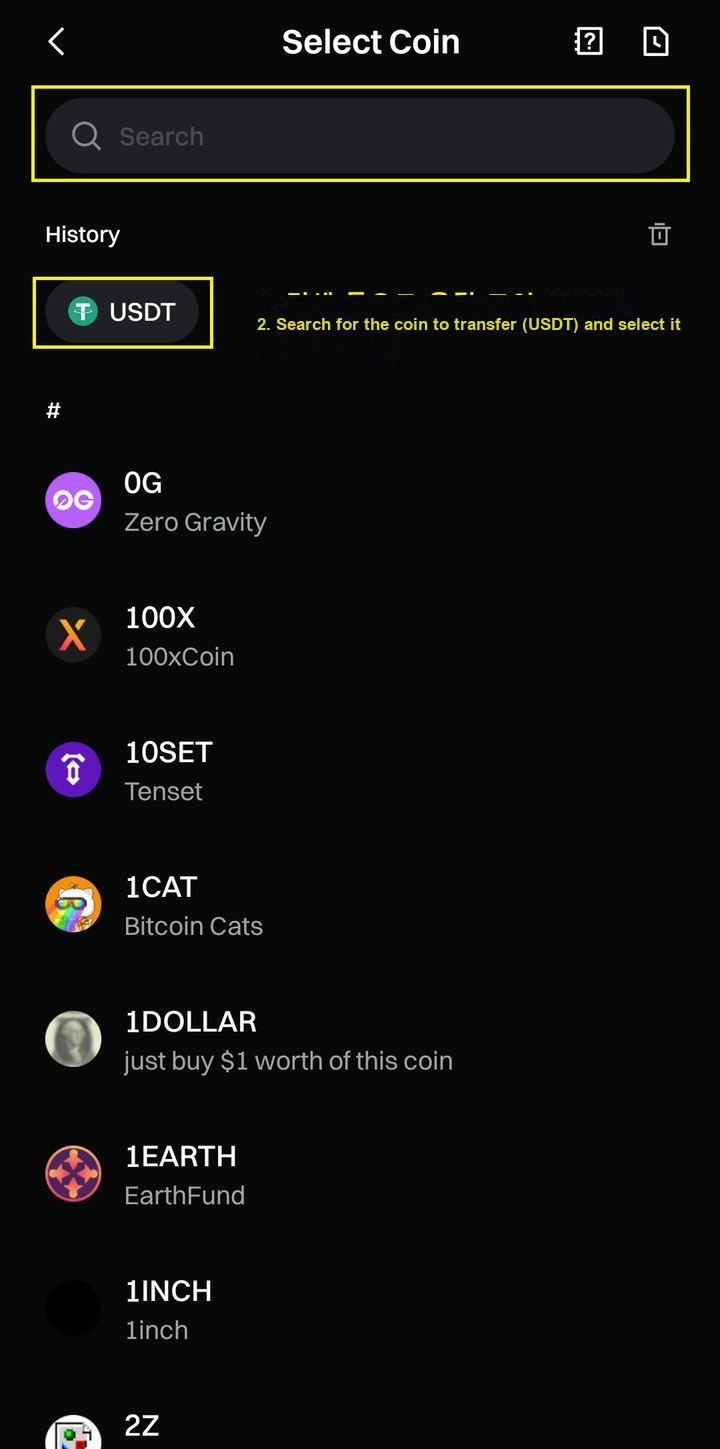
Search for and select 'Tether (USDT)'.
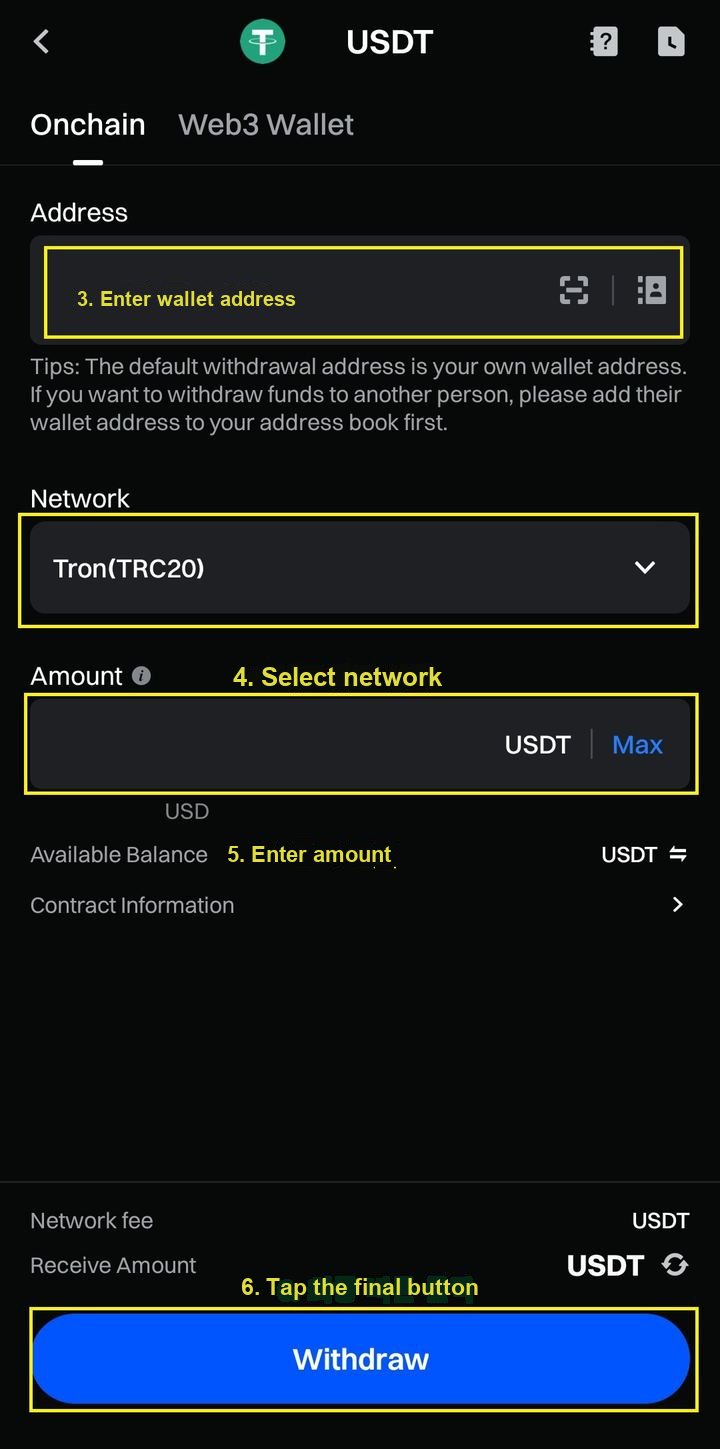
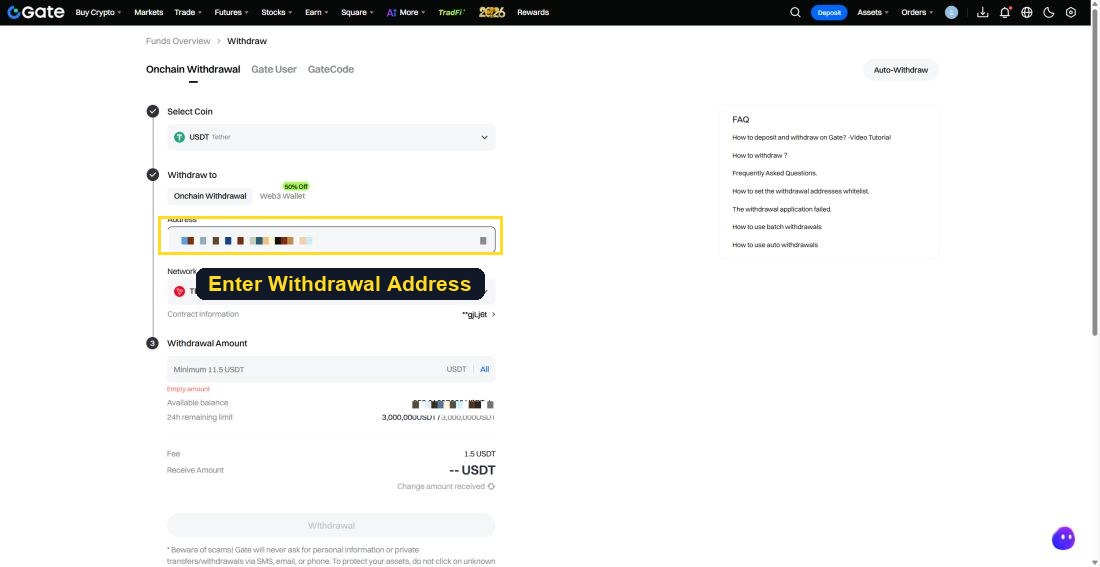
Enter the destination deposit address, network (Tron) and amount, then tap 'Withdraw'.
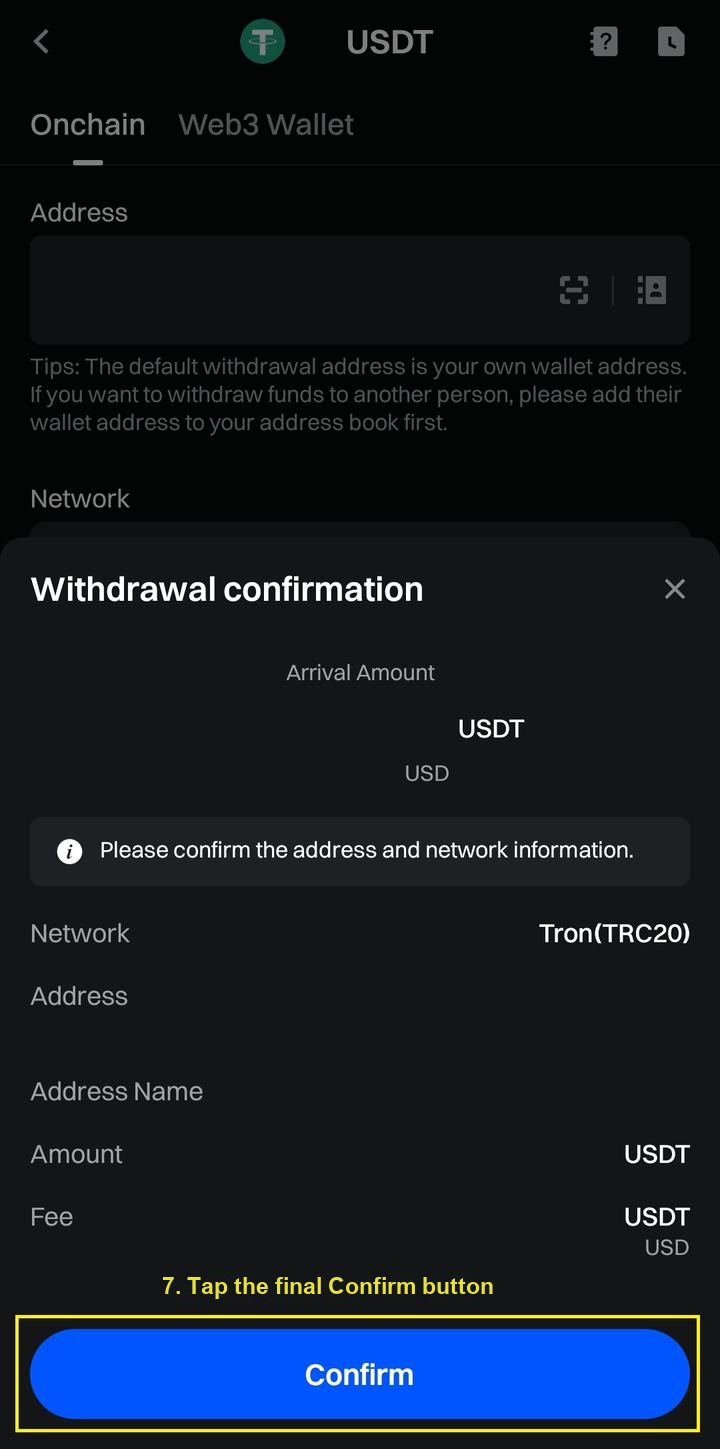
After confirming the info, Confirm → complete account password and phone verification.
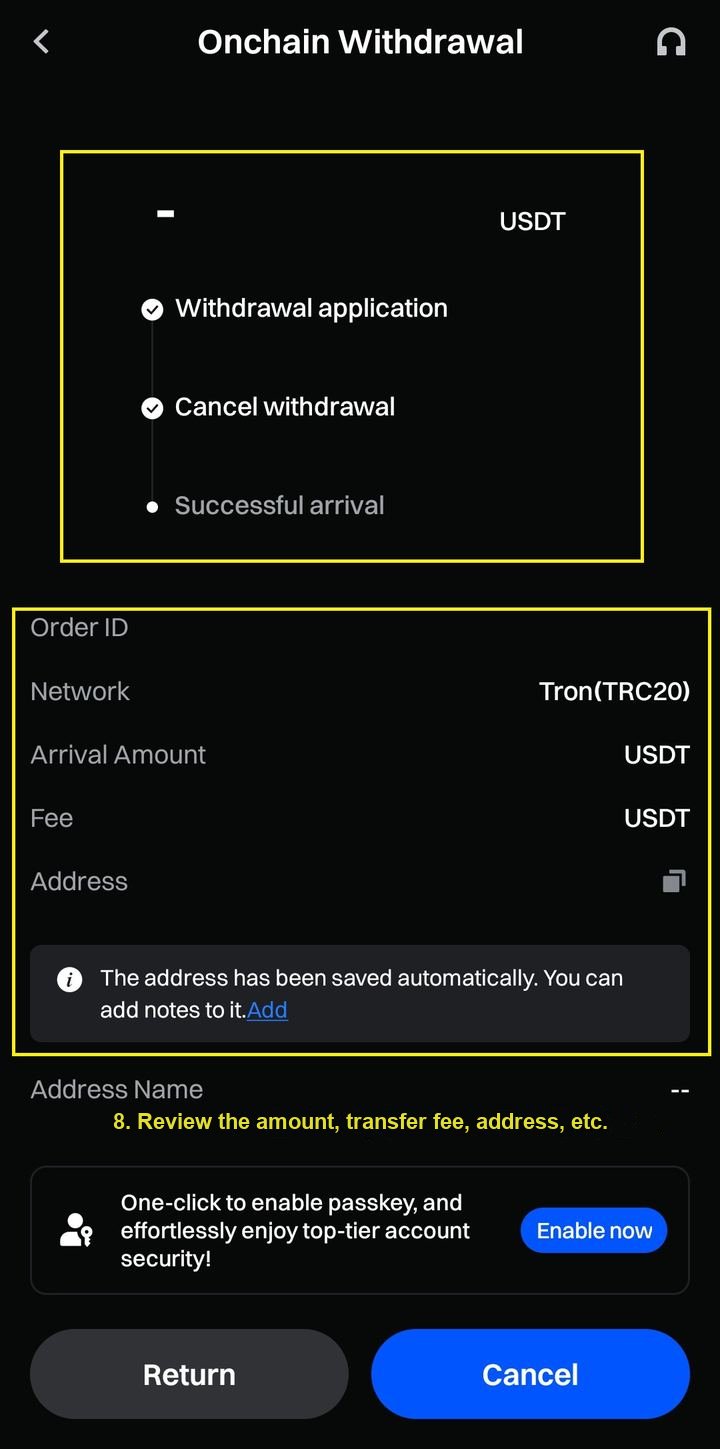
Recheck the final details such as amount, transfer fee, address, and network.
Core Concepts of Futures Trading
2-1What Is a Position (Long / Short)
A position means a state where you have bet on a price direction (up/down). It is not 'buying' a coin but entering a contract on price movement.
- Long — Betting on a price rise
- Short — Betting on a price fall
2-2What Is Leverage
Leverage is a multiplier that lets you trade an amount larger than your own capital. E.g., 1 million KRW seed × 10x leverage → operating a position worth 10 million KRW.
| Category | Stocks (Credit/Margin Loan) | Overseas Futures | Crypto Futures |
|---|---|---|---|
| Meaning of the Multiplier | Loan ratio | Contract unit expansion | Position size relative to margin |
| Applied To | Investment capital (account assets) | Number of contracts | Position notional amount |
| Multiplier Setting | Fixed (e.g., 2x) | Fixed per product | User chooses directly (1–100x) |
| Margin Concept | None (loan structure) | Margin per contract | Collateral to maintain the position |
| Loss Limit | Loss beyond principal possible (debt) | Theoretically unlimited | Total margin wiped out (liquidation) |
| Liquidation Concept | Forced counter-trade | Liquidation when margin is insufficient | Forced liquidation exists systemically |
| Effect of Higher Multiplier ↑ | Increased interest burden | Increased volatility risk | Liquidation price moves closer to the entry price |
Correct understanding — "10x means 'taking a position 10x the size of my money', not that the price moves 10x."
E.g., 1,000 USD seed × 10x = 10,000 USD position. Even a -1% price move means a 100 USD loss (-10% of my seed). About a -10% move wipes out most of the margin → liquidation.
Leverage is not a multiplier that grows profits but a device that adjusts the price-movement range allowed before liquidation.
2-3The Difference Between Margin and Seed
- Seed — The entire account assets
- Margin — The amount actually tied to a specific position
When you use leverage, profit/loss and liquidation are calculated based on margin, not the entire seed. That is, even if seed remains, the position is forcibly closed if the margin cannot hold. This differs depending on Cross/Isolated mode.
2-4Cross and Isolated
- Isolated — Uses only that position's margin → the loss range at liquidation is clear
- Cross — Uses the entire account seed as margin → one position can put the whole account at risk
2-5The Exact Meaning of Forced Liquidation
Forced Liquidation is the exchange forcibly closing a position before losses exceed the margin limit. It is a safeguard to prevent larger losses, and at liquidation the margin is mostly wiped out.
The key point is that liquidation is not a 'mistake' but a structural result of the combination of leverage, margin, and volatility. If you receive a liquidation warning (email/app push) during trading, it is a signal that your margin has already entered the danger zone.
Overall Structure of the Futures Exchange UI
3-1The Futures Screen Layout at a Glance
Most futures exchanges' mobile screens consist of an order paneland a position panel. (Names and layout may differ slightly by exchange.)
order panel
- Ticker and current symbol
- Margin Mode / leverage / Position Mode
- Funding fee (funding fee / settlement time)
- Order type / entry seed · entry seed slider
- Asset Mode
- Long (buy) / Short (sell) order
position panel
- Current position / Open Orders list
- Unrealized PnL · profit-card share
- Position status (position / Margin Mode / leverage)
- Current position (margin × leverage) · current margin
- Entry average price · liquidation price
- TP/SL settings · Reverse
3-2Order Panel Explanation
- Market — Executed immediately at the best currently available price Slippage possible during sharp moves
- Limit — Specify your desired price; executes only when reached
- Quantity Input — Enter the contract quantity directly / enter by amount or percentage (ratio to margin) When entering by percentage, you must check the position size including leverage
- Margin Mode — Cross (shares the whole account's margin) / Isolated (only that position) With Cross, one position's liquidation affects the entire account
- Reverse — Instantly flips the current position to the opposite (long↔short) Quantity and leverage flip as is
- Trigger — The order executes automatically when a specific price is reached Trigger price ≠ actual execution price
- Position Mode — One-way (single direction) / Hedge (long and short simultaneously) When changing, existing positions must be cleared
- Asset Mode — Single-Asset / Multi-Asset Multi-Asset makes liquidation calculation complex
3-3Position Panel Explanation
- Entry Price — The average execution price of the held position (changes to the average when adding to it)
- Liquidation Price — The price at which margin falls below maintenance margin (varies by leverage, margin, and mode) With Cross, it varies in real time
- Unrealized PnL — Profit/loss while the position is not closed (reflected in real time) May be a figure before fees/funding fees are applied
3-4Trade History UI Explanation
Futures trading is not simply a structure where only fees are deducted. Due to funding fees, partial liquidation, position adjustments, slippage, etc., the unrealized PnL you saw on the chart often does not come in as realized PnL as is. To check "where my money went" and "what my actual net profit is", checking the History is essential.
Pressing the document-shaped icon at the top right of the position panel usually lets you check the following 5 items.
| Item | Description |
|---|---|
| Open Orders | List of currently unfilled orders (including limit and trigger) Checking neglected orders is essential |
| Order History | Order request records (filled/canceled/partially filled) — check "why it wasn't filled" |
| Trade History | Actual fill records (execution price, quantity, fee) Key for checking accumulated fees |
| Position History | Full record from position entry to close (realized PnL, funding fee, fee) — core data for review |
| Transaction History | All fund movements within the account (funding fees, fees, forced liquidation, margin changes) Most important when finding "why money suddenly decreased" |
Entering Positions and Trade Settings
4-1Entering a Position
Entering a position is not the act of pressing a button once, but a 'result of decisions'.
- ① Decide Direction — Long (rise) / Short (fall)
- ② Approach to Leverage — Not a profit-amplifying tool but a risk-amplifying device. The multiplier is decided according to your stop-loss range, not your 'conviction'
(e.g., 2% stop × 5x = 10% actual loss / 2% stop × 20x = 40% actual loss) - ③ Cross vs Isolated — For beginners, Isolated with a clear loss limit is the default
- ④ Market (Taker) vs Limit (Maker) — Instant execution/slippage vs desired price/execution uncertainty
4-2Market vs Limit
| Category | Market | Limit |
|---|---|---|
| Execution Method | Instant execution | Executes when the price is reached |
| Role | Consumes liquidity | Provides liquidity |
| Fee | Taker (higher) | Maker (lower) |
| Slippage | Possible | None |
| When to Use | Sharp moves/breakouts | Planned entry |
Even for the same profit, realized profit differs depending on the entry method. Frequent market orders eat into profit through fees.
4-3Take-Profit (TP) / Stop-Loss (SL)
Take-profit and stop-loss are not a response after entry but a 'plan' that must already be set before entry. An entry with no criteria is less a trade than a bet left to emotion.
After holding a position, emotion takes over judgment, like delaying the stop-loss when losing and shrinking the take-profit when winning emotion replaces judgment. So calculate the take-profit/stop-loss prices and the risk-reward ratio first before entry, and set TP/SL at the moment of entry.
4-4Partial Fill · Order Cancellation · Closing a Position
Partial Fill — A phenomenon where the order quantity is not all filled at once but filled in parts. It occurs often with limit orders; only the volume present in the market is filled first, and the rest waits unfilled. It is not an error.
Situations Where an Order Cannot Be Canceled
- An already partially filled order → the filled quantity cannot be canceled, only the unfilled quantity can
- A trigger order (TP/SL) not yet triggered → being a conditional order, it is easy to mistake for an instant cancel
- A Reduce Only order → it does not execute if the position direction does not match
- Network delay / UI sync → cases where it was actually canceled but the screen reflects it late
Closing a Position — ① Take-profit (TP) ② Stop-loss (SL) ③ Manual close. Closing a position = finalizing realized PnL. A market close is fast but has higher fees; a limit close has favorable fees but carries execution risk.
Fee and Cost Structure
In futures, profit/loss is not determined by price alone. If you do not understand the fee and cost structure, you will keep experiencing situations where "I clearly did it right, but money is decreasing."
5-1What Is a Trading Fee
A trading fee is incurred once each when you open and close a position (round trip) , and the more leverage you use, the more it is calculated based on the position amount. E.g., 100 USD seed × 10x = 1,000 USD position → the fee is charged based on 1,000 USD.
TetherPlus Partner Exchange Futures Fees & Payback
| Exchange | Maker | Taker | TetherPlus Payback |
|---|---|---|---|
| Gate.io | 0.01% | 0.025% | 50% |
| Bitget | 0.0128% | 0.0256% | 36% |
| Flipster | 0.02% | 0.06% | 35% |
| Deepcoin | 0.01% | 0.025% | 50% |
| OrangeX | 0.02% | 0.06% | 50% |
※ Maker/Taker are based on futures trading fees and may vary by tier and event. Payback is the TetherPlus self-referral refund rate relative to the fees incurred.
5-2Maker / Taker Difference
- Maker — A limit order that places an order on the order book to supply liquidity to the market. It stabilizes the exchange's execution environment, so it gets a fee discount/preferential rate
- Taker — A market order that immediately fills an existing order, consuming liquidity. It increases volatility, so as the price of convenience it gets a higher fee
General benchmark: Maker 0.01–0.02% / Taker 0.04–0.06%.
5-3The Concept of Funding Fees
A funding fee is a cost you pay or receive to maintain a position, and it is incurred simply by holding, regardless of price movement. It is a mechanism that keeps expiry-free perpetual futures from diverging significantly from the spot price.
Crypto has strong bullish sentiment, so there are many long participants and futures tend to be higher than spot. So for most of the time, a positive funding fee (longs pay shorts)is the default, and when fear is extreme, a negative funding fee (shorts pay longs) can also occur.
- Usually once every 8 hours settled
- Normal range ±0.01–0.03%, overheated range 0.1% or more
- Major coins are stable, but altcoin funding fees spike("alts die by funding fees") → continuous monitoring is essential
Ex 2) Extreme range (negative funding) — longs receive 0.3574% every 8 hours / shorts pay 0.3574%
It is a structure where, even if your direction is right, the account can collapse from funding fees alone.
5-4"Why Money Decreases Even When I Did Nothing"
This phenomenon is mostly due to ① accumulated Taker fees ② continuous funding fee outflow . Especially if your entry was right but you hold the position long and use frequent market orders, it becomes a structure where you lose even by just holding, like spot.
Now that you understand the structure of trading,
Get Your Fees Back with TetherPlus
Get up to 50% of the futures fees incurred on partner exchanges back daily in Tether (USDT). A single self-referral registration applies for life.